

YOUR CART IS CURRENTLY EMPTY
How do I set up a TV on a portable screen stand?
What is a portable screen stand?
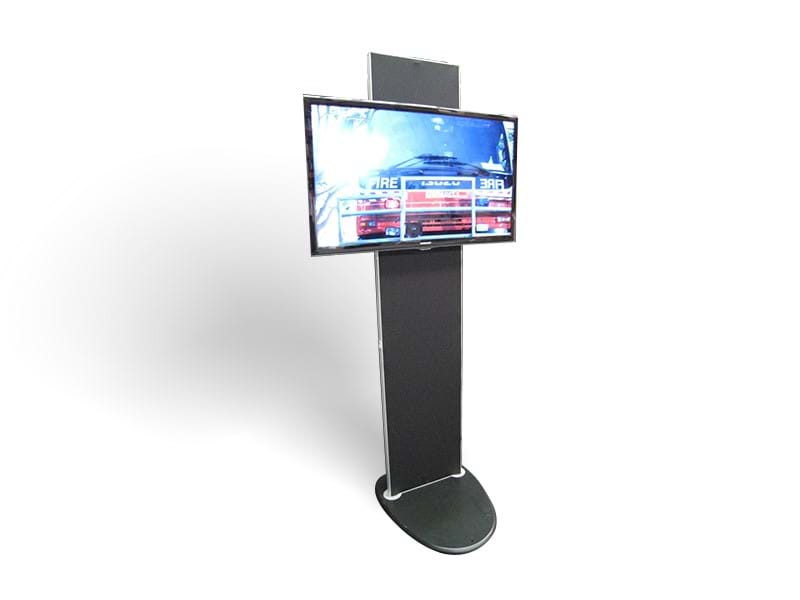
A portable screen stand holds a TV up on your stand, without a wall to mount it on. Our TV 2 Go is an aluminium-framed stand with a universal TV mounting bracket and matt black fabric covers over the frame. The whole system weighs 25kg and packs into a hard shell road case on wheels.
Why use your own TV?
Hiring a TV and trolley through an event's organisers and their appointed hirers can cost more than $800 for a single day. With a portable stand, you bring your own TV to every show. If you don't have one, we can supply a standard TV to buy or hire.
Will my TV fit?
The TV 2 Go takes LED TVs up to 55" or LCD TVs up to 43", and it doesn't need any adaptors for different screen sizes. The TV can be mounted wide, or turned upright in portrait.
If you order it with the high top road case, we can set the case up to carry a TV of up to 43" inside it as well as the stand, so the TV travels protected.
Check your TV's screen size and type before the event, not when you're setting up on the day.
What you'll need
- Your TV, its power cable and the cable for your laptop or media player
- A cable cover, or gaffer tape if the venue allows it, for any cable that crosses the floor
Steps to set up a TV on a portable screen stand
1. Wheel the road case to your stand and work out where the screen will go. Put it where people walking past can see it, close to a power point.

2. Take out the stand and put the aluminium frame together, then stand it up on its base.
3. Fit the matt black fabric covers over the frame.
4. Lay the TV face down on a soft, clean surface, like its own packing foam or a folded blanket. Screw the two "bullet" connectors into the mounting holes on the back of the TV.
5. Lift the TV and slide both bullet connectors onto the bracket on the frame. Most TVs are light enough for one person to lift, but get help with a large or heavy screen.
6. Gently check the TV doesn't move on the frame, and that the stand sits flat and doesn't rock.
7. Plug in the power and your media player, and run the cables down the back of the stand, out of sight.
Note: Don't leave a cable lying loose across a walkway. Safe Work Australia lists electrical cables among the low obstacles people trip on. Run it under a cable cover, or tape it down if the venue allows it. Some venues and shopping centres ban tape on their floors, so check first.
8. Turn the TV on and check the picture from the aisle, at the distance people will see it from.
9. Finally, to pack up, slide the TV up off the bracket, unscrew the bullet connectors, and pack the TV and the stand back into the road case, and you're done!
How can I brand the stand?
You can add a printed panel to the backing behind the TV, and a printed wrap or stretch cover to turn the road case into a small sales counter. Each has an artwork guide on the product page. The front panel artwork is 464mm wide x 2240mm high, including 5mm bleed on all sides, and its guide shows the approximate area the TV covers. Keep your logo and key copy clear of that area, so the screen doesn't hide them.
Need some help?
We're here for you
If you're needing some advice or just a helping hand, please get in touch with our team, by clicking this button. Complete the enquiry form and one of our specialists will call you back as soon as we can.