

YOUR CART IS CURRENTLY EMPTY
How to specify displays for a visitor centre or foyer
A permanent display in a visitor centre, museum, campus or corporate foyer works every day, often with no staff nearby. Visitors lean on it and touch it, it gets cleaned often, and from time to time someone has to open it up to change what's inside.
That's why a good specification covers more than the look. It says what goes on display, how secure it needs to be, how it will be cleaned and how the contents get changed over. If you send every supplier the same answers, the quotes you get back can be compared line by line. Here's what to think about, with a checklist at the end.
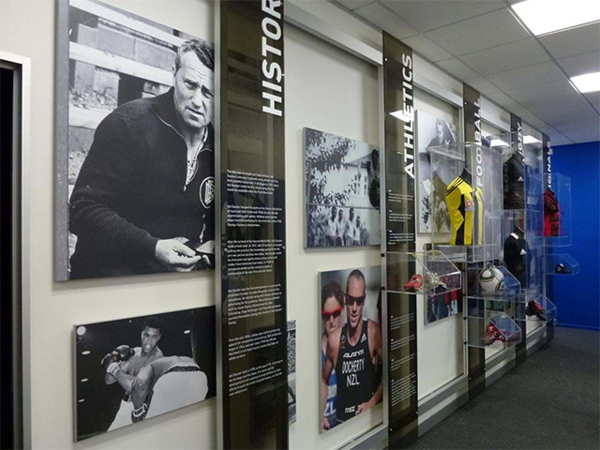
#1 - Choose printed, digital or interactive
Most visitor centres end up with a mix. Pick each format for the job it does best.
- Printed panels and graphics. Best for the story that doesn't change: history, maps, key facts and wayfinding. They need no power and no software, and they can be read by several people at once. Updating them means reprinting, so keep anything that changes often off them.
- Digital screens. Best for content that changes: events, opening hours, video and rotating highlights. A screen can be built into a display wall so it reads as part of the exhibit rather than a TV beside it. With a content management system (CMS), messages can be scheduled by time of day or day of the week and updated remotely.
- Interactive touch screens. Best when visitors need to explore: a searchable archive, a map, a quiz or a sign-up form. Our interactive digital kiosk comes in 55 or 65 inch, and our interactive flat panels can be built into walls or custom frames.
A simple test: if visitors should browse and choose, go interactive. If they should watch and remember, a non-touch screen does the job for less.
#2 - Decide how secure each object needs to be
Start with the object, not the case. A replica or a product sample needs less protection than an original or a valuable piece.
- Open display. Suits robust or large objects. The Western Australian Museum's free Collections Care Manual advises keeping objects out of touching distance, "generally an arm's length or a minimum of 800mm", using low or sloping plinths, rope barriers or acrylic or glass screens.
- A showcase on a plinth. A clear cover on a solid base keeps hands off smaller objects. Our showcase plinths can have a lockable door made to suit, or the cover can be fixed to the base with security screws. A cover that simply slides over the base is meant for low-security spaces.
- Keys. The same manual recommends locks or security screws on all showcases, and at least two sets of keys kept where they can be reached in an emergency. With several cases, it suggests keying them all to the same locking system.
#3 - Choose perspex or glass for the case
A perspex display case is an acrylic case: Perspex is a trade name that has become the everyday word for acrylic sheet, so the two words describe the same material. Acrylic is lighter and cheaper than glass and less likely to break. Glass is harder to scratch and better suited to large cases. Our clear showcases are generally made from acrylic.
The Western Australian Museum's manual sets out the trade-off. Acrylic is easier to replace but scratches more easily and can craze with constant cleaning. As a general guide it recommends acrylic for displays planned for up to two years and glass for longer.
For acrylic plinths, ask how the corners are joined. We cut our plinth acrylic with an angled edge to make a mitred corner, which looks cleaner than a butt join and makes the join 40% stronger. Our floor-standing acrylic plinths use 6mm acrylic as standard, and as a rough guide a 400mm square plinth up to 1,000mm high takes about 20kg. Tell us if your object is heavier.
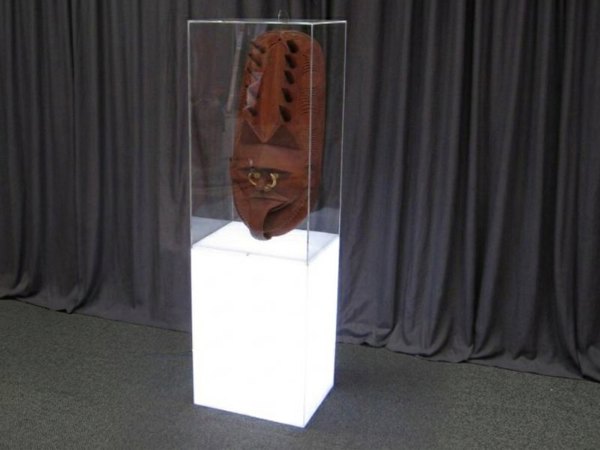
#4 - Size the case around the object
Measure the object with everything that sticks out, then allow room to place it and lift it out again. For the best look, keep the showcase just a little taller than the tallest object in it.
Our standard showcase plinth widths are 300, 400, 500 and 600mm square, with heights from 100 to 1,200mm. A typical plinth is 400mm square and 900mm high, with a showcase about 300 or 400mm high on top. Custom sizes are made to order. For height bands and top sizes, see our plinth sizes guide.
#5 - Plan the lighting and screens
Lighting draws the eye, but light also fades sensitive objects, and the damage can't be undone. The museum's Collections Care Manual recommends 50 lux for sensitive materials such as textiles, works on paper, colour photos and plastics, and 250 lux for more robust items such as wood and bone. It also says no light level is completely safe, so it suggests showing sensitive items for less than six months. It recommends keeping heat-producing lights out of showcases. It notes that LED lighting gives off little UV and runs cooler, which suits showcase use.
Our illuminated plinths use LED modules. Battery packs suit temporary displays. For a permanent display, ask for a mains-powered module that plugs straight into the power point. If an object is light sensitive, tell us in the brief. The manual also suggests showing copies of important photos and documents rather than the originals.
For screens, specify the hours they will run. Our flat panels are rated for 24/7 use, and a screen built for continuous public display is a different product from a domestic TV.
#6 - Write down the cleaning routine
A public display is cleaned far more often than a stand at a show, so put the cleaning method in the specification.
- Acrylic. Use a microfibre cloth with water and detergent or a mild cleaner. Our acrylic plinths come with a cloth. Acrylic scratches if objects are dragged across it.
- Touch screens. Agree which cleaning products the cleaners may use on the glass, and whether the screen should be turned off or locked while it's wiped.
- Printed panels. Ask for a surface the cleaners can wipe down where visitors touch it.
#7 - Plan access for changeovers
Someone will need to open the case, swap the contents and close it again without putting the objects at risk. The Western Australian Museum's manual says case doors should give at least 60 to 90% access to the display area. Doors should be light enough for one person to open safely.
For screens, decide who updates the content and how. With a CMS, your team or ours can change what plays remotely, without sending a technician on site.
Spec checklist for comparable quotes
| Item | What to tell each supplier |
|---|---|
| Objects | What each object is, its size including anything that sticks out, its weight and value, and whether it is light sensitive |
| Format | Printed, digital or interactive, and what visitors should do at each point |
| Security | Open display, slide-over cover, lockable door or security screws; keyed alike; number of key sets |
| Case material | Acrylic or glass, and how long the display will run |
| Sizes | Plinth footprint and height, showcase internal size, floor space available |
| Lighting | Light levels for sensitive objects, LED, battery or mains power |
| Screens | Size, orientation, hours of use, touch or non-touch, content source, who manages the CMS |
| Cleaning | Products and methods your cleaners will use, and how often |
| Access | How often the contents change, door type, who holds the keys |
| Delivery | Site address, access route, installation date and any after-hours limits |
Send us your checklist, or call 1300 240 250, and we'll quote the plinths, cases and screens to match.