

YOUR CART IS CURRENTLY EMPTY
Adding a screen to a pull-up or pop-up stand
Published
Quick answer
Don't hang a TV off a pull-up banner: a pull-up is designed to hold a banner, not a screen. Stand the screen beside it on a portable TV stand: our TV 2 Go takes LED TVs up to 55 inch, and the whole 25kg system packs into a wheeled case. If the screen goes to every show, build it into the display instead: a smaller monitor can attach to our Blade Stand (up to 23 inches) or our SuperWall, and a screen tower or display wall takes bigger screens. If you change the message often, make the banner itself the screen with a digital banner stand.
Three ways to add a screen
Field and event teams usually start with a pull-up or a pop-up wall, then decide they want video on the stand as well. There are three ways to do it:
- Stand the screen beside the display on its own portable TV stand or plinth. This is the quickest option and works with the banners and walls you already own.
- Build the screen into the display, by attaching a smaller monitor to a Blade Stand or SuperWall, or using a free-standing tower or display wall for a bigger screen. The screen and graphics read as one piece.
- Replace the printed banner with a screen, using a digital banner stand that is the same shape as a pull-up.
Which suits you depends on how often the kit travels, the screen size, your budget, and how often the message changes.
Why a screen doesn't belong on a pull-up banner
A pull-up banner stand is designed to do one job. On our Premier, you pull the tensioned banner up out of the base and attach it to a single back support pole, and the whole stand weighs less than 6kg. Nothing on it is designed to carry a TV. Fix a screen to the pole or the banner and you add weight high up on a light base, so the stand is easier to tip in a busy aisle, and you load parts that weren't designed to carry it.
Show rules point the same way. The exhibitor manual for the Sydney Build expo at ICC Sydney, for example, says "All walls and structures must be self-supporting and not rely on support from neighbouring stands, venue walls or pillars." Give the screen its own support, either a stand or a display built to carry it.
Option 1: a portable TV stand beside your banner
A separate stand keeps things simple. Your pull-up or pop-up stays as it is, and the screen goes wherever the layout works best on the day.
Our TV 2 Go exhibition TV stand is built for this. The frame is aluminium, dressed in matt black fabric, with a universal bracket for the TV, and the kit travels in a hard-shell road case on wheels.
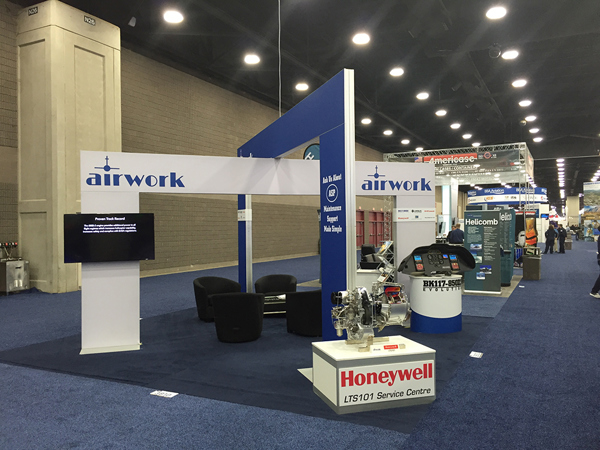
- Screen size: LED TVs up to 55 inch, or LCD TVs up to 43 inch, with no adaptors needed for different sizes. The TV can be mounted wide or turned upright in portrait.
- Weight: the whole system weighs 25kg and packs into its wheeled case.
- The TV travels with it: order the high-top case and we can set it up to carry a TV of up to 43 inch inside, as well as the stand.
- Branding: add a printed panel behind the TV ($254 ex GST), or a printed wrap ($242 ex GST) that turns the case into a small sales counter. There is also an artwork guide for a front panel at shopping centre height.
- Price and stock: from $1,286 excluding GST and freight. The TV 2 Go is in stock.
Bring your own TV, or hire one from us. Every screen we supply can be hired, and our standard TVs (43 inch is the most popular size) can be supplied on a TV stand or mounted to a display wall.
The trade-off: a separate stand is one more item to carry, and a screen standing beside a banner looks added on rather than designed in.
Option 2: a screen built into the display
When the screen goes to every event, building it in gives a cleaner result.
In a slim banner stand. For a pull-up footprint with video in it, our Blade Stand can take a screen of up to 23 inches mounted into the stand. It is only 30mm thin, the frame is covered by a one-piece fabric skin, and one person should be able to assemble the stand in under 5 minutes without tools. It comes in 600, 900 or 1,200mm widths, and heights of 1.2m (desktop), 1.5m (shopping centre), 1.8m, 2.4m or more. Ask us which size suits your screen.
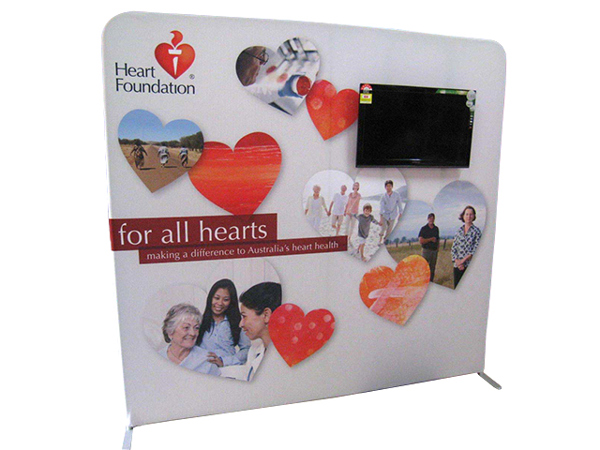
On a fabric backdrop wall. A smaller monitor can also attach to our SuperWall fabric backdrop, so the screen sits on the wall itself rather than on a separate stand. Ask us which screen sizes suit your wall.
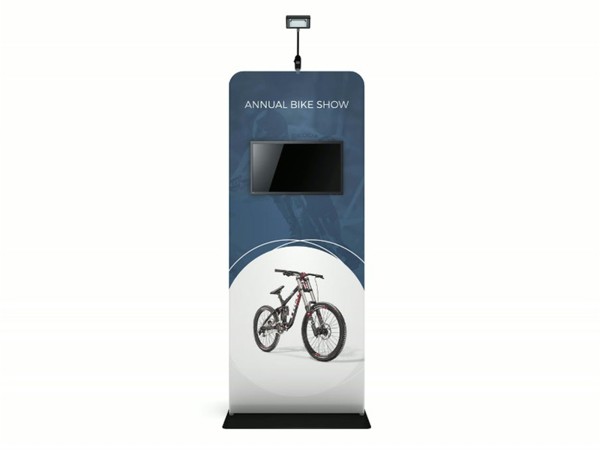
In a screen tower. Our Streamline display is a free-standing unit with the screen mounted inside the frame, and your graphics and logo around it. The standard version is a 950mm wide x 2m high aluminium frame with a 43 inch LCD TV, support feet and graphics on both sides, from $2,113 excluding GST. The most popular screens for it are 32, 43 and 50 inch, the frame can be made to suit other sizes, and it can be set up to pack into carry cases. Because it is slim, it works double-sided in the open or backed against a wall. Each one is custom built, and the lead time is about 2.5 weeks.
In a display wall. A screen can also be built into a display wall with a digital screen, so the whole back wall reads as one design. On a small stand this frees the floor space a separate TV stand would take. If you only need the screen for one event, the digital equipment can be hired.
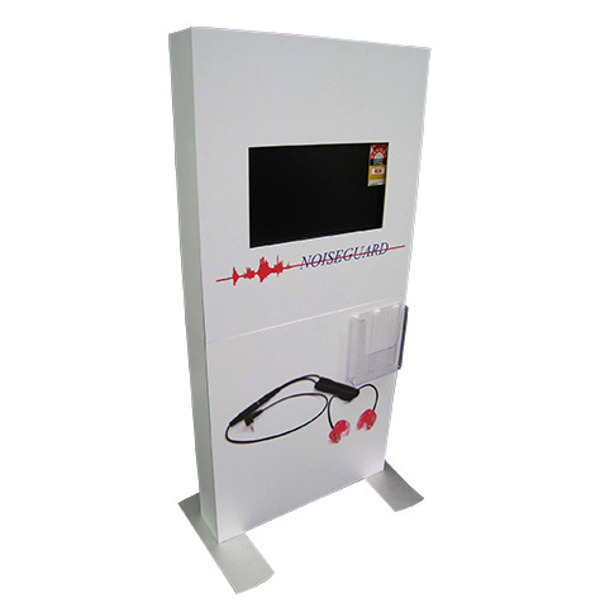
The trade-off: a built-in screen is planned at the design stage, and changing the screen size later can mean a new frame or graphic.
Option 3: make the banner the screen
If you reprint banners often, a digital banner stand replaces the print with a screen of the same shape. Ours is 570mm wide x 1.9m high and 35mm thick, with a 2.5mm pixel pitch as standard (1.9mm is also available). It can stand on a steel base plate or a fold-out stand, hang from cables or mount to a wall, and you can group several into a larger digital wall.
Content updates over Wi-Fi, the phone network, USB or a PC, and our optional Media Manager content management system can send new content to several screens on a schedule. Most units at the standard 2.5mm pitch cost in the vicinity of $10,000 excluding GST each, including the processor. Each is custom built, and the lead time is about 7 weeks.
The trade-off: it costs far more up front than a printed pull-up. If you reprint banners regularly, though, the saving on reprints can cover the cost within a couple of years.
Which option suits your kit?
| Option | Screen | Weight and packing | Price (ex GST) | Lead time |
|---|---|---|---|---|
| TV 2 Go portable TV stand | LED up to 55 inch, LCD up to 43 inch | 25kg system in a wheeled case | From $1,286, plus TV | In stock |
| Blade Stand with a screen | Up to 23 inch | 30mm thin; packs down into its parts, wheeled case optional | Ask us | Ask us |
| SuperWall with a monitor | Smaller monitors | Fabric backdrop; frame packs down | Ask us | Ask us |
| Streamline screen tower | 43 inch standard; 32 and 50 inch popular | Supplied assembled; can pack into carry cases | From $2,113, TV included | About 2.5 weeks |
| Display wall with a built-in screen | To suit the wall design | Depends on the wall | Ask us | Ask us |
| Digital banner stand | 570mm x 1.9m LED | Base plate or fold-out stand | About $10,000 per unit (2.5mm pitch) | About 7 weeks |
Choose the TV 2 Go when you already own banners and walls and want a screen next month. Choose a Blade Stand or SuperWall for a smaller monitor attached to the display itself, and a tower or wall for a bigger screen in a stand you will reuse. Choose a digital banner when you change your message often enough to justify the cost.
Power, cables and content
Every screen needs power where it stands and a way to play content. Plan both before the show:
- Test and tag. All six major convention centres in our guide require electrical equipment to be tested and tagged, and at MCEC that includes brand new leads. Our guide to convention centre stand rules has the detail for each venue.
- Hide the cables. Shopping centres set their own rules for leads on the floor. Vicinity Centres, for example, calls for centre-approved cable covers at pop-up kiosks, because "any kind of tape is not sufficient". Route leads down the back of the stand, not across the walkway.
- Load the content. The Streamline's screens have HDMI and USB inputs, so you can connect a laptop or media player, or stream wirelessly. Test your files on the screen before the event, at the distance people will see them from.
- Pick the right screen. If the screen doesn't need to run for long periods, a standard TV can be far more cost-effective. The Streamline normally uses a domestic-grade TV to keep the cost down. Our flat panels are rated for 24/7 use, so ask for one if the screen will run all day, every day.
Next step
Tell us what you have now (pull-up, pop-up or fabric wall), the screen size you want and your event dates, and we'll recommend the TV stand or screen-ready display that fits. Call 1300 240 250 or send an enquiry from the TV 2 Go page.