

YOUR CART IS CURRENTLY EMPTY
How do I create a dieline in Adobe Illustrator, in design or Photoshop?
Why do we set a dieline?
A dieline (also known as a knifeline) is a graphic element placed in artwork, that is used as the template to produce a die. The die enables the printed artwork to be cut to a particular shape to suit your requirements.
The dieline is typically placed into the artwork print file as a separate layer, which allows the user to ensure it is correctly located relative to the print component.
How to set the dieline
Firstly, ensure all your artwork is set up in CMYK format. If you are unsure how to do this, refer to our separate guide for setting up spot colours to CMYK.
In order for the dielines to be separated from the CMYK artwork so they do not print, they are typically set to a spot colour. We prefer the full cutline to be set to one colour and the fold line set to a different colour. The dielines should be set on separate layers and named accordingly, as shown below.
Use the following steps to set up dielines correctly
1. Create the cut file using Adobe Illustrator, irrespective of what design software you’ve used to create your artwork. If your artwork is in any other format than Illustrator (e.g. InDesign, Photoshop, CorelDraw), simply save the file as a flattened PDF and open or place the PDF in Illustrator.
2. With the file open, check the Document Colour Mode is set to CMYK. In the main menu, go to File > Document Color Mode > CMYK Color
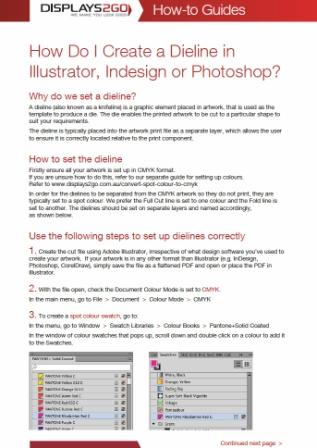
3. In Illustrator, open Window > Swatches. In the Swatches panel menu, choose New Swatch.
4. Name the swatch Full Cut, set Color Type to Spot Color, then choose a distinct colour and click OK.
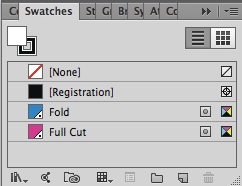
5. If your artwork needs fold lines, create another spot swatch named Fold in a different colour. Keep these technical names as shown.
6. Create your dieline on a separate layer, with the outline colour set to the spot swatch with no fill.
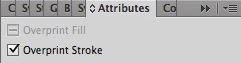
IMPORTANT: Select the dieline paths, open Window > Attributes, then tick Overprint Stroke.
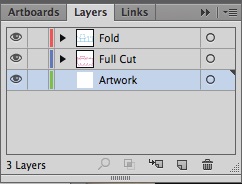
7. Name the layers either ‘Full Cut’ or ‘Fold’
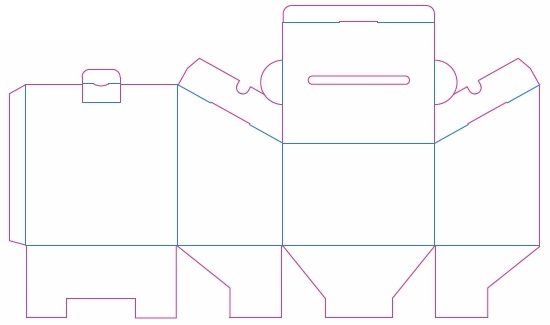
8. The dielines can be made up of individual segments or continuous lines. An example of a dieline showing full cut and fold lines is shown on the left.
Need some help?
We're here for you
If you're needing some advice or just a helping hand, please get in touch with our team, by clicking this button. Complete the enquiry form and one of our specialists will call you back as soon as we can.