

YOUR CART IS CURRENTLY EMPTY
What size snap frame or poster frame do I need?
How are snap frames sized?
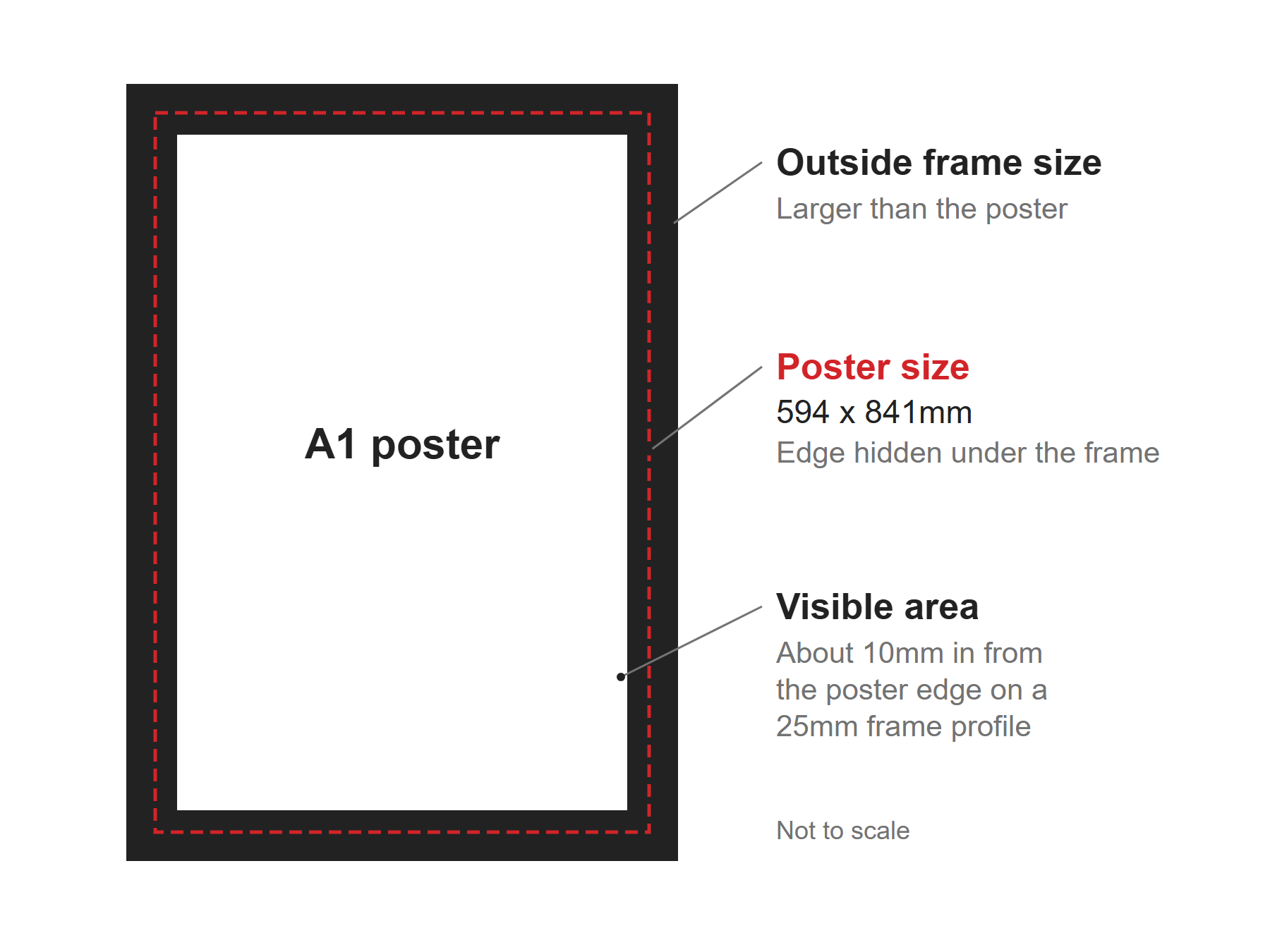
Snap frames and poster frames are named after the poster they take, not their outside size. An A1 snap frame holds an A1 poster, which is 594 x 841mm. Australian poster sizes follow the ISO 216 A series, so the frame sizes do too.
There are really three different measurements for every frame:
- Poster size: the paper or print you put in, e.g. A1.
- Visible area: what people actually see. The frame's edge overlaps the poster to hold it in place, so this is a little smaller than the poster. On a 25mm wide snap frame profile, for example, the frame covers about 10mm of the poster all round.
- Outside size: the frame from edge to edge. It's larger than the poster, because the profile sits around the outside.
Snap frame and poster frame sizes
Sizes are width x height, portrait. For landscape, swap the two values.
| Frame size | Poster size (mm) | Typical use |
|---|---|---|
| A4 | 210 x 297 | Point of sale, counters, room-door schedules |
| A3 | 297 x 420 | Point of sale, counters, room-door schedules |
| A2 | 420 x 594 | Posters, flip charts |
| A1 | 594 x 841 | Shop windows, wayfinding, stand posters |
| A0 | 841 x 1189 | Shop windows, wayfinding, stand posters |
| B2 | 500 x 707 | Posters between A2 and A1 |
| B1 | 707 x 1000 | Posters between A1 and A0 |
Each A size is half the area of the one above it, and every size has the same proportions. That means a design made for one A size scales to another without cropping or distortion. See our guide to poster sizes for the full A0 to A8 chart in mm, cm and inches.
Which frame size should I choose?
Choose by viewing distance and by what the poster has to say. A shop window poster has to work from the footpath, so start at A1 or A0, portrait. Point of sale and counter signs are read at arm's length, so A4 or A3 is usually enough. For conference wayfinding, directions read on the move suit A1 or A0, while room-door schedules suit A3 or A4.
If you already have frames on the wall, the choice is made for you. Measure them first, then design to fit.
Use the following steps to find the right frame size
1. Open the frame. A snap frame's sides hinge open, so lift all four sides of the profile to release the poster.
2. Measure the poster or the backing board inside, not the outside of the frame. Measure width first, then height.
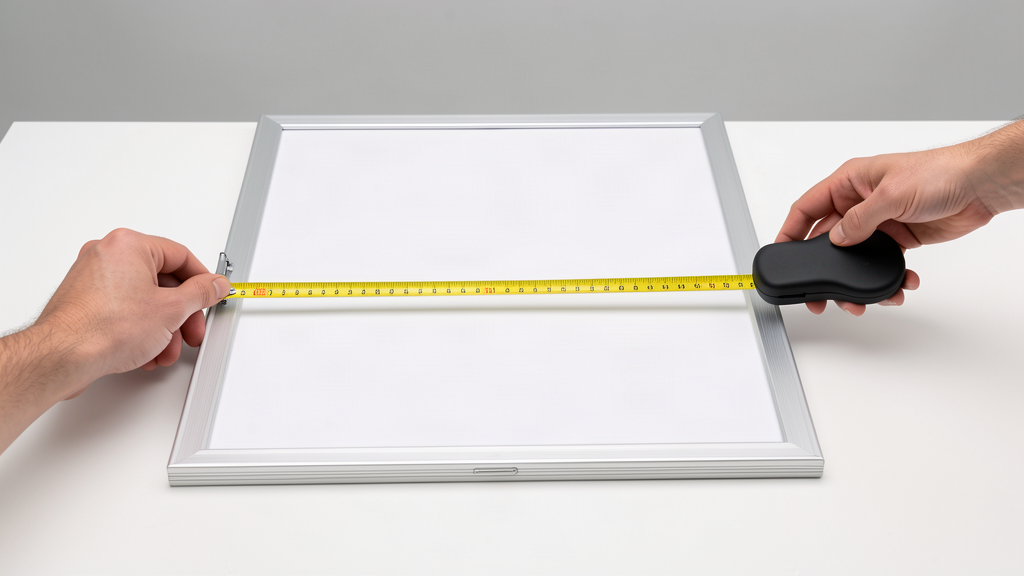
3. Match your measurement to the poster size column in the table above.
Note: If it doesn't match an A or B size, you may have an imperial frame. Have the print made to your exact measurement instead.
4. Finally, order your poster at that size, close the frame over it and you're done!
How do I set up artwork for a snap frame?
Our artwork specifications cover the details. For a frame, the main points are:
- Size: set up the file at 100% of the poster size, or in proportion.
- Bleed: add 10mm on every edge unless a template says otherwise. An A1 file with bleed is 614 x 861mm. The bleed is trimmed off, so the finished print fits the frame exactly.
- Keep it clear of the edge: a 25mm frame profile hides about 10mm on each side (check your own frame), so keep text, logos and phone numbers well inside the trim.
- Resolution: at least 150ppi at 100% of the finished size for best results. 75ppi is the lowest we accept.
We print posters in house on our wide-format printers, from single-use event posters to long-life prints. See printing and production for more.
Need some help?
We're here for you
If you're needing some advice or just a helping hand, please get in touch with our team, by clicking this button. Complete the enquiry form and one of our specialists will call you back as soon as we can.