

YOUR CART IS CURRENTLY EMPTY
All you need to know about LED walls on exhibition stands
An LED wall gives an exhibition stand a big, bright, seamless screen. It is built from modules tiled together, so it is sized to your stand rather than picked from a TV catalogue. Getting it right comes down to three decisions: how big the wall should be, what pixel pitch it needs, and what content will play on it.
This page takes each decision in turn for stands from 3 x 3m up to island sites. The step most teams miss is working out how many pixels the wall really has before anyone designs the content, so we show you how to do that too. If you're still deciding whether LED is the right format, start with our comparison of LED walls, projection and LCD video walls.
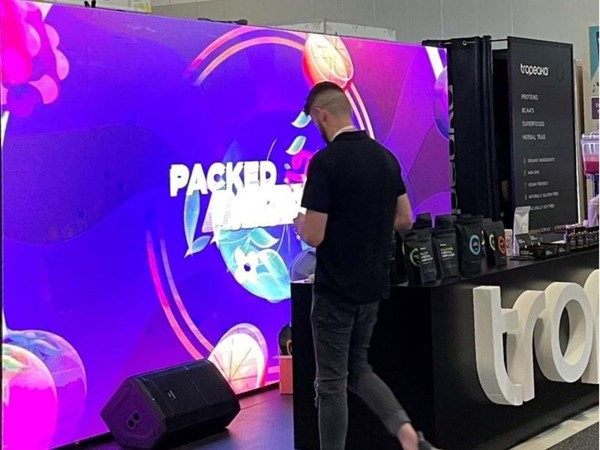
How an LED wall is put together
Our LED walls are usually made of 500mm x 500mm modules. Once they are tiled, wired and programmed, the modules work together as a single, joint-free picture.
That module grid sets the sizes you can have. With 500mm modules a wall grows in 500mm steps across and up, so a 4m x 2.5m wall is 8 modules across and 5 high, 40 modules in all.
Each wall is built to the size and specification of the job and quoted individually. Timing is confirmed once the specification is agreed, and most LED walls take about three weeks to produce. You don't have to buy one: most exhibitors hire for the show, and every screen we supply is available for hire.
What size LED wall suits your stand?
Start with two numbers from the floor plan and the exhibitor manual: the stand's width and the height you're allowed to build to. In Australia the most common stand sizes are 2 x 2m, 2 x 3m, 3 x 3m and 3 x 6m, and sites of 6 x 6m or more are usually custom or space-only stands.
3 x 3m stands
On a 3m frontage the wall can't be wider than 6 modules, and shell scheme walls are lower than many people expect: at one 2025 show at ICC Sydney they were 2.5m high panels. An LED wall that size takes the whole back wall, leaving no room for printed branding.
That is why the usual choice on a small stand is a flat screen. In our experience the most common setup is one 55 inch flat screen on a floor stand, looping a product video, because it is simple to run. Our TV 2 Go portable TV stand is designed for exactly that. Choose LED on a 3 x 3m stand only when the screen is meant to be the back wall.
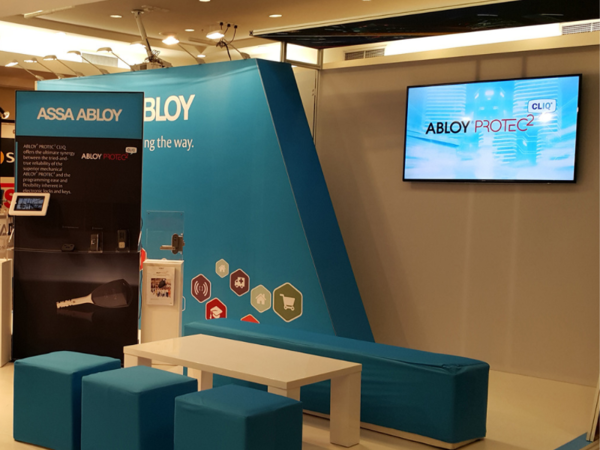
If you want a screen without giving up wall or floor space, overhead digital screens hang above the stand. Ours are double-sided, 3m in diameter and sized for stands from 3 x 3m up to 3 x 6m. The hire price doesn't cover hanging the screen or connecting power and wi-fi, but we can help with both.
6 x 3m stands
A 6m back wall is where an LED wall starts to make sense. A 4m x 2.5m wall (8 x 5 modules) leaves 1m either side for printed graphics or a store room door.
Weight comes with it. Each module is typically 9 to 12kg, so those 40 modules come to 360 to 480kg before the frame is added. Venues set rules on floor loading, power and rigging, so raise all three early.
Island and space-only stands
An island stand is open on every side, so a single wall faces only one aisle. Two walls back to back, or a wall on a central tower, reach more of the hall. A screen flown above the stand helps people find you from across the floor.
Height is the limit to watch. ICC Sydney's event safety guidelines, for example, say structures in Exhibition Halls 1 to 4 "cannot exceed 5m in height", and all custom stand plans must be submitted to the venue for review. Other venues and organisers set their own limits, so check the manual for your show.
Pixel pitch in one paragraph
Pixel pitch is the gap between neighbouring pixels, measured in millimetres. The smaller the gap, the more tightly the pixels are packed and the sharper the image looks up close. On a stand, visitors walk right up to the wall, so it needs a finer pitch than a wall seen from across the hall, and a finer pitch costs more per square metre. Our resolution and pixel pitch buyer's guide explains how to match the pitch to the viewing distance.
Work out the wall's real pixel size before you make content
An LED wall doesn't have a standard resolution like a TV. A Full HD screen is 1920 x 1080 pixels and a 4K screen is 3840 x 2160, but an LED wall's pixel count depends on its pitch and how many modules it has.
The sum is simple:
- Pixels across 500mm = 500mm ÷ pixel pitch (500mm ÷ 1.95mm = about 256 pixels).
- Wall width in pixels = modules across x pixels per module (8 x 256 = 2,048).
- Wall height in pixels = modules high x pixels per module (5 x 256 = 1,280).
Here is the same 4m x 2.5m wall at three indoor pitches:
| Pixel pitch | Pixels across 500mm | 4m x 2.5m wall (8 x 5 modules) |
|---|---|---|
| 1.95mm | 256 | 2,048 x 1,280 |
| 2.6mm | 192 | 1,536 x 960 |
| 3.91mm | 128 | 1,024 x 640 |
The pitches and pixel counts are examples from one manufacturer's published data sheets. Ask your supplier for the exact pixel count of the wall you're quoted, because pitches and module layouts vary.
Three things follow for whoever makes the content:
- The wall has fewer pixels than you'd guess. At 2.6mm this 4m wall is narrower in pixels than a Full HD video, and even at 1.95mm it is only a little wider than Full HD and about half the width of 4K. Have content made at the wall's exact pixel size. A 4K file will be scaled down, and small text and fine detail suffer most.
- The shape is rarely 16:9. Eight modules by five is a 16:10 shape, a little taller than most video. Decide whether to crop, add a background or make a version for the wall, rather than finding black bars on show day.
- Bold beats fine. On a coarser pitch, thin type and hairline graphics break up. Use large, heavy type, strong contrast and simple shapes.
Content that works on the show floor
Visitors walk past at pace and often can't hear your video, so lead with the product in the first few seconds and make every scene make sense on its own. Our guide to digital technologies for exhibition displays covers sound-off content, screen placement and sound limits.
Two points are specific to LED walls on stands:
- Watch the bottom of the wall. A counter, speaker, product or presenter in front of the wall hides its lower edge, so keep logos and key words well clear of the bottom.
- Reuse what you have. An existing brand film or TV advertisement can run on a loop, and our in-house team can build new content from the artwork and footage you already have.
Test it before the show
- Get the wall's pixel size and shape in writing before design starts.
- Review the content on a screen of the same shape, from the distance visitors will stand.
- Check every frame for text or faces that are too small to read at that distance.
- Have us load and test the content on the screens before bump-in.
We can deliver and set up the wall, program it, update the content and manage it remotely.
What to tell us
- Stand size, open sides and the floor plan.
- The venue and show dates. An LED wall adds weight, power and often rigging, and power and rigging rules vary by venue, so we check them with the organiser early.
- Where the wall will go and how close visitors will stand.
- The content you have, and who will make anything new.
- Hire or buy.
Send us your stand plan and content, or call 1300 240 250, and we'll size the wall and quote it.