

YOUR CART IS CURRENTLY EMPTY
How can I maximise engagement at my stand?
Visitors step onto exhibition stands they can see into, that show something worth stopping for, and where the staff make walking in feel easy. Open the front, put your brand and one hero feature where people see them from down the aisle, and add movement: a live demo, a screen or a game.
Then plan each hook around the visitor you want, not around everyone walking past. Below are common questions exhibitors ask about drawing people in.
How do I make my stand feel open and inviting?
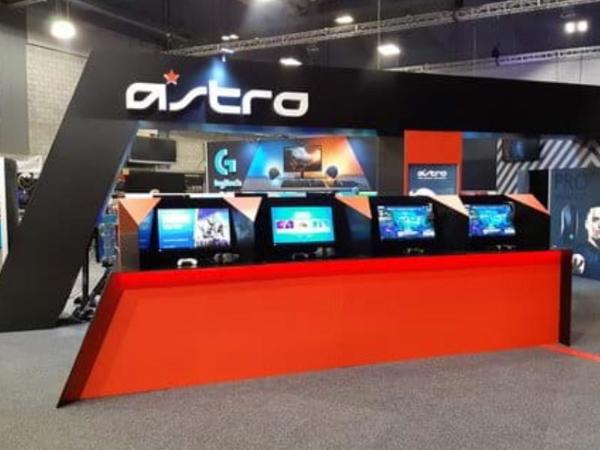
People decide from the aisle whether a stand is for them, and many won't step past a table or a wall to find out. One of the simplest changes that pulls more people in is an open front.
- Move the counter back or to one side. A counter across the front edge reads as "staff only".
- Leave a clear path in. Visitors should be able to take two steps onto the stand without squeezing past anyone.
- Keep walls to the back and sides. Solid walls on aisle-facing edges block the view of what's inside.
Do show rules limit the walls on my stand?
Some organisers write open fronts into their rules. One 2025 exhibitor manual for a show at ICC Sydney (Sydney Build, 7-8 May 2025) limited walls along an aisle to 30% of that boundary. Your exhibitor manual sets the rule for your show. Check it and ask the organiser to confirm the permitted wall length before you design.
How do I get my stand seen from down the aisle?
Visitors see a stand from a distance before they see it close up. Put your brand name high, where it shows over people's heads, and keep the main message short enough to read on the move. When we design custom exhibition stands, we plan for sightlines from the aisle and for graphics that read from about ten metres away.
How high can my stand and signage go?
Height is where show rules bite. In the same Sydney Build 2025 manual:
- walls, structures and signage could not exceed 3m without the organiser's approval, and no structure could exceed 5m
- perimeter walls and storage rooms were limited to 2.5m without approval
- custom stands needed organiser and venue approval for any wall or structure above 1.2m high facing an aisle
- banners rigged from the ceiling had to be trimmed to at least 4.5m to the underside, and only space-only stands over 36m² could apply to rig
Each show sets its own limits. Check the manual first, then design up to them.
What should be the focal point of my stand?
A stand with ten things to look at has no focal point. Choose one hero feature that sums up why you're there, and build the stand around it: a product at full size, a working machine, a striking wall graphic or a single large screen. Light it, give it space, and put it where it can be seen from the aisle.
The hero feature also gives your staff an opening line. "Have you seen this working?" is an easier start than "Can I help you?"
Which screens and lighting help draw people in?
Movement catches the eye in a hall full of static walls. A screen running product footage, a live data feed or a short loop does that job well, if the content is made for the aisle: big type, no sound needed, and a message that makes sense in a few seconds.
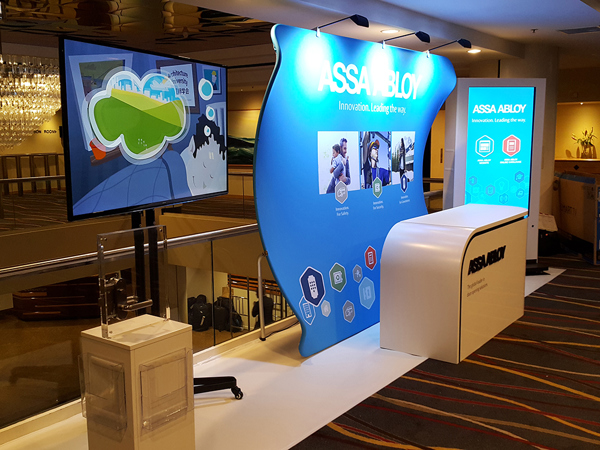
- Screens. The TV 2 Go exhibition TV stand holds up to a 55" LED TV (or a 43" LCD TV), packs into a wheeled case, and the case can be wrapped to become a counter. All our screens can also be hired.
- Lighting. Spotlights on the hero feature and lit graphics make a stand look open and finished, especially in a dim hall.
Touchscreens, QR codes and short polls give visitors something to do as well as watch. Keep each one quick, and make the last step a conversation with your team. Screen and AV options are covered in more depth in our FAQ on digital technologies for exhibition displays.
Can I use sound or a microphone on my stand?
Keep it low. The Sydney Build 2025 manual banned PA systems, microphones and sound amplification on stands, and capped noise at 50 decibels measured at the perimeter of your stand. It also needed the organiser's prior written authorisation for hi-fi, radio or video, so check the rules before you plan screen content with sound.
Are live demonstrations worth running?
Yes. A live demonstration shows business buyers the product doing its job, which a brochure or a screen can't. Schedule demos at set times, post the times on the stand, and have someone ready to talk to the people who stay to watch.
Do games and giveaways attract the right visitors?
Games work when the play does some qualifying. A prize wheel is a simple one to run: it suits busy shows, and the clicker carries down the aisle. Ask for something first, such as a short registration or an answer to a product question, and let the spin follow. Skill challenges, leaderboards and touchscreen quizzes are compared in our guide to gamification at trade shows, including the trade promotion rules.
Giveaways pull people in, so aim them. A useful item for your buyers, handed over after a conversation, is worth more than a bowl of sweets on the counter.
Which stand activities do show manuals restrict?
Check the manual before you plan any activity. At Sydney Build 2025:
- on-stand promotions were allowed only if they didn't interfere with other exhibitors, and presentations that crowded the aisles weren't permitted
- activities couldn't spill into the aisles, and literature could only be handed out from your own stand
- food and drink sampling was allowed only where it was a core function of the business, and hospitality food and drink had to come through the venue's caterers
- exhibitors couldn't give away alcohol in any form, and helium balloons weren't permitted
How do I choose the right activity for my objective?
Start with what you want from the show, then choose the activity that delivers it.
| Objective | Activities that suit it | What to capture |
|---|---|---|
| New leads at volume | Prize wheel, quick quiz, short registration | Name, company, role, one qualifying answer |
| Fewer, better-qualified leads | Live demo, product challenge, expert clinic | The problem they're trying to solve, timeframe |
| Meetings with key accounts | Pre-booked appointments, a seated meeting area | Next step and date |
| Launch or awareness | Hero product reveal, screen content, photo backdrop | Opt-in for updates |
| Customer feedback | Live polls, short surveys | Answers, plus permission to follow up |
Smaller touches still earn their place when they fit the objective: a charging point that keeps people on the stand, a short educational session, or a relaxed networking hour at the end of a show day.
How should stand staff behave to invite people in?
The design gets people to slow down. Staff get them to step in. Stand at the front edge facing the aisle, not behind the counter. Keep phones away and conversations between colleagues short. Open with a question about the visitor, not a pitch. Our FAQ on stand staffing best practices has the full list of dos and don'ts.
How do I check my stand on the first morning?
Walk the aisle towards your stand on the first morning and check:
| Check | Why it matters |
|---|---|
| Can you see into the stand from the aisle? | Visitors won't walk in blind. |
| Is the front clear of counters and boxes? | A clear path reads as an invitation. |
| Can you read the brand and main message from a distance? | People decide before they arrive. |
| Is there one obvious hero feature? | It gives the eye, and your staff, a place to start. |
| Is something moving or happening? | Movement stops people. |
| Are staff at the front and off their phones? | People approach people who look ready to talk. |
| Do the activities stay within your stand and the noise limit? | Breaking manual rules can get an activity shut down. |
If your stand keeps getting walked past, talk to us about a custom exhibition stand designed to pull people in, or call 1300 240 250 with your show, stand size and what you want visitors to do.